Rotate/Swap your Coldkey
This page describes how to rotate or swap the coldkey in your wallet. This operation migrates your entire on-chain identity, including TAO balances and subnet ownership, to a new cryptographic key pair.
It is critical to swap your coldkey if you think it has been leaked or compromised, as your coldkey secures your wallet's identity and assets.
See:
- Wallets, Coldkeys and Hotkeys in Bittensor
- Coldkey and Hotkey Workstation Security
- Coldkey swap blockchain sourcecode.
Coldkey swaps are only necessary if you need to migrate a coldkey with subnet ownerships or registrations.
If you only hold and stake TAO, you do not need to perform a coldkey swap. Instead, simply transfer your staked and unstaked TAO to the new coldkey. For more information, see btcli wallet transfer and btcli stake transfer --all.
Introduction
The coldkey swap mechanism provides a secure way to switch to a new coldkey, if you feel the secrecy of your wallet's coldkey secret key needs to be improved.
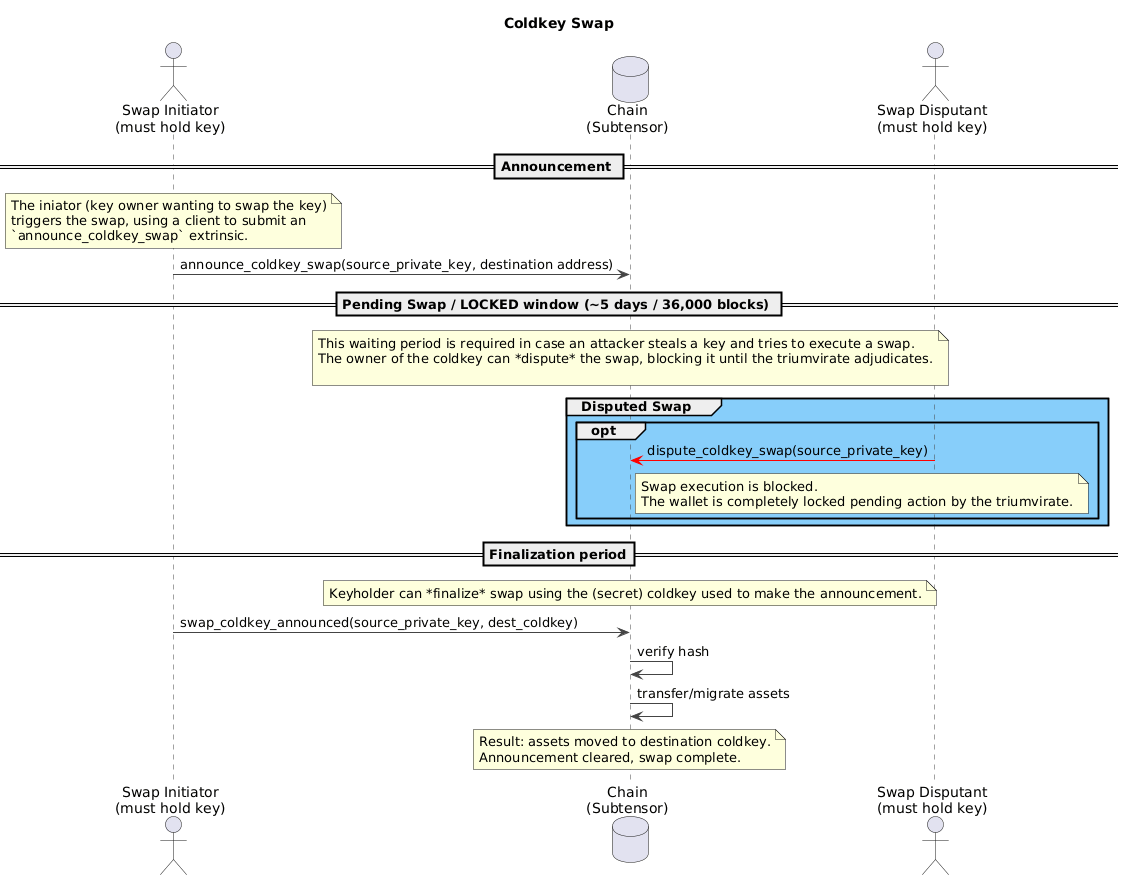
Because they are such sensitive operations a security perspective, coldkey swaps unfold in several careful stages:
- Initiation/Announcement
In the first step, the coldkey owner initiates the swap by making an announcement on the blockchain that the swap will occur. This triggers a mandatory waiting period, during which the wallet is locked to prevent operations such as transfers or staking. During this phase, the coldkey can only execute or dispute a swap.
At this initiation step, the coldkey owner provides the destination wallet address, which remains private, as only a hash is published to the blockchain.
- Pending Period
Next, a pending or lock-out period must elapse, during which the swap can be disputed but not finalized. Currently, the waiting/locked period is 36,000 blocks (~ 5 days).
- Disputation or Finalization
- Disputing a coldkey swap prevents the execution of the swap and completely blocks the coldkey from performing any operations. At this point, the triumvirate is required to resolve the dispute. The coldkey private key is required to dispute a swap.
- If the Pending Period expires without the swap being disputed, the coldkey owner must finalize the swap by again providing the destination coldkey. The blockchain verifies that this key matches the recorded hash before proceeding.
- If the destination coldkey already has an existing identity, it will be preserved rather than being overwritten, and the assets of the source wallet will be transferred/merged into this existing wallet.
- The cost for a coldkey swap transaction is 0.1 TAO. This must be available in the source coldkey when the swap is announced. Upon successful execution all assets are migrated to the destination coldkey. This includes all TAO, all stake in subnets, control of any hotkeys, and any subnet ownership.
Coldkey swaps are needed when a coldkey has been compromised/leaked, that is, if it is possible that someone else could have copied or recorded it in some way and can reproduce it. If someone gains your coldkey private key, they can take all of your wallet's assets, so any possibility of a compromise should be taken seriously.
To limit the opportunity to compromise your most valuable coldkey, you can use another wallet as a proxy. With a properly configured proxy (a ProxyType limited to specific actions, and non-zero delay), even if an attacker gains access to your proxy wallet, they cannot immediately drain your funds—the delay gives you time to detect and reject unauthorized transactions.
For high-value wallets, consider setting up a Staking proxy for regular staking operations instead of using your coldkey directly.
See Proxies: Overview to learn how to protect your coldkey proactively.
Prerequisites
To follow along with the below examples:
- You must own the source coldkey to be swapped.
- A destination (new) coldkey public key.
- To safely experiment with this and other blockchain operations, you can deploy a your own instance of Subtensor (Bittensor's blockchain component).
Confirm the identity of the destination coldkey. A mistake here can result in loss of all of the source coldkey's assets and identity.
- If you are rotating the coldkey to maintain ownership, you must control the destination coldkey privatekey. Otherwise you will lose control over all of the source coldkey's assets and identity.
- If you are transferring ownership to someone else, confirm that they have secure control of the destination coldkey private key.
- The destination coldkey should not have any existing associations with hotkeys on-chain, which may result in unexpected consequences.
Check pending (announced) coldkey swaps
You can fetch a list of all pending coldkey swaps, or check a paricular coldkey for pending swaps:
You can check the details of all coldkey swap announcements, or announcements associated with a particular coldkey. This allows you to verify that your announcement is active while inspecting the committed hash and the target block for execution.
- BTCLI
- Bittensor SDK
Run the following command to check coldkey swaps using BTCLI. Replace WALLET_NAME with the source coldkey address, or use --all instead.
btcli wallets swap-check --wallet-name WALLET_NAME
Show sample output
Enter wallet name or SS58 address (leave blank to show all pending announcements): alice

                                          Pending Coldkey Swap Announcements
                                                  Current Block: 115

 Coldkey                                          ┃ New Coldkey Hash      ┃ Execution Block ┃ Time Remaining ┃ Status
━━━━━━━━━━━━━━━━━━━━━━━━━━━━━━━━━━━━━━━━━━━━━━━━━━╇━━━━━━━━━━━━━━━━━━━━━━━╇━━━━━━━━━━━━━━━━━╇━━━━━━━━━━━━━━━━╇━━━━━━━━━
 5GrwvaEF5zXb26Fz9rcQpDWS57CtERHpNehXCPcNoHGKutQY │ 0x94772f97f5...ae2160 │           36111 │         4d 23h │ Pending
Fetch the current coldkey swap announcement (if any) by calling get_coldkey_swap_announcement. Set WALLET_NAME to a wallet on disk that holds the coldkey you want to query, or replace coldkey_ss58 with any coldkey SS58 address.
import bittensor as bt

subtensor = bt.Subtensor(network="local")
wallet = bt.Wallet(name="WALLET_NAME")

response = subtensor.get_coldkey_swap_announcement(
    coldkey_ss58=wallet.coldkeypub.ss58_address
)

print(response)
Announce a coldkey swap
Before swapping a coldkey, users must first announce their intention to swap coldkeys by providing the new coldkey and then wait the required delay interval before executing the swap.
To announce a coldkey swap:
- BTCLI
- Bittensor SDK
Run the following command to announce a coldkey swap using BTCLI. Set WALLET_NAME to your source wallet name (or SS58 address) and DESTINATION_COLDKEY to the destination coldkey SS58 address.
btcli wallets swap-coldkey announce \
--wallet-name WALLET_NAME \
--new-coldkey DESTINATION_COLDKEY
Show sample output
Wallet selected: Wallet (Name: 'alice', Hotkey: 'default', Path: '/Users/chidera/.bittensor/wallets/')
New coldkey wallet: Wallet (Name: 'swap-test', Hotkey: 'default', Path: '/Users/chidera/.bittensor/wallets/')
Using the specified network local from config
[19:16:41] Warning: Verify your local subtensor is running on port 9944. subtensor_interface.py:91
Announcing Coldkey Swap
Item ┃ Value
━━━━━━━━━━━━━━━━━━━━━━╇━━━━━━━━━━━━━━━━━━━━━━━━━━━━━━━━━━━━━━━━━━━━━━━━━━━━━━━━━━━━━━━━━━━━
Current Coldkey │ 5GrwvaEF5zXb26Fz9rcQpDWS57CtERHpNehXCPcNoHGKutQY
New Coldkey │ 5FHqAJM9jtVccTctCVmEvxzzm6qeA2yfbqcLFZLMipRKS1cB
New Coldkey Hash │ 0x278149779b423b9294031351e042580000f6f0bce1fbf3a217a27be977c6d080
Swap Cost │ 0.1000 τ
Delay Before Execution│ 5d
──────────────────────┼────────────────────────────────────────────────────────────────────
│
Are you sure you want to continue? [y/n] (n): y
✅ Successfully announced coldkey swap
✅ Your extrinsic has been included as 208-2
Coldkey Swap Announced
Item ┃ Value
━━━━━━━━━━━━━━━━━━━━━╇━━━━━━━━━━━━━━━━━━━━━━━━━━━━━━━━━━━━━━━━━━━━━━━━━━━━━━━━━━━━━━━━━━━━
Original Coldkey │ 5GrwvaEF5zXb26Fz9rcQpDWS57CtERHpNehXCPcNoHGKutQY
New Coldkey │ 5FHqAJM9jtVccTctCVmEvxzzm6qeA2yfbqcLFZLMipRKS1cB
New Coldkey Hash │ 0x278149779b423b9294031351e042580000f6f0bce1fbf3a217a27be977c6d080
Execution Block │ 258
Time Until Executable│ 4d 23h
─────────────────────┼────────────────────────────────────────────────────────────────────
│
After the delay, run:
btcli wallet swap-coldkey execute --new-coldkey 5FHqAJM9jtVccTctCVmEvxzzm6qeA2yfbqcLFZLMipRKS1cB
Announce a coldkey swap (starts the mandatory waiting period) by submitting announce_coldkey_swap. Set WALLET_NAME to your source wallet name on disk and DESTINATION_COLDKEY to the destination coldkey SS58 address.
import bittensor as bt

subtensor = bt.Subtensor(network="local")
wallet = bt.Wallet(name="WALLET_NAME")

new_coldkey_ss58 = "DESTINATION_COLDKEY"

# Announce the coldkey swap
response = subtensor.announce_coldkey_swap(
    wallet=wallet,
    new_coldkey_ss58=new_coldkey_ss58,
    wait_for_inclusion=True,
    wait_for_finalization=True,
)
print(response)
A coldkey swap can be reannounced only after the ColdkeySwapReannouncementDelay has passed. By default, this is 7,200 blocks (~1 day) after the initial announcement delay period expires. Reannouncing will overwrite the existing announcement and reset the mandatory waiting period before execution.
Execute/finalize a coldkey swap
After the announcement waiting period has passed, the source coldkey can now execute the swap to finalize the process. Attempting to execute a coldkey swap before the announcement delay period has passed will return an error.
To execute a coldkey swap:
- BTCLI
- Bittensor SDK
Run the following command to execute a coldkey swap using BTCLI. Set WALLET_NAME to your source wallet name (or SS58 address) and DESTINATION_COLDKEY to the destination coldkey SS58 address.
btcli wallets swap-coldkey execute \
--wallet-name WALLET_NAME \
--new-coldkey DESTINATION_COLDKEY
Show sample output
Wallet selected: Wallet (Name: 'alice', Hotkey: 'default', Path: '/Users/chidera/.bittensor/wallets/')

New coldkey wallet: Wallet (Name: 'swap-test', Hotkey: 'default', Path: '/Users/chidera/.bittensor/wallets/')

Using the specified network local from config
[18:59:12] Warning: Verify your local subtensor is running on port 9944.                                                                                                                    subtensor_interface.py:91

                       Executing Coldkey Swap

            Item ┃ Value
━━━━━━━━━━━━━━━━━╇━━━━━━━━━━━━━━━━━━━━━━━━━━━━━━━━━━━━━━━━━━━━━━━━━━
 Current Coldkey │ 5Gxhv5iZGBvvR6YJeEdLmvZ7hSHbE6FdHc43fLqMVkhki7j4
     New Coldkey │ 5G4HAHNfT3TFvXMi53LLCR4vsBbSeKXUPsBycDtfbkroMVP9
─────────────────┼──────────────────────────────────────────────────
                 │

WARNING: This action is irreversible. All assets will be transferred.

Are you sure you want to continue? [y/n] (n): y
Decrypting...

✅ Successfully executed coldkey swap!
✅ Your extrinsic has been included as 39386-2

                      Coldkey Swap Completed

            Item ┃ Value
━━━━━━━━━━━━━━━━━╇━━━━━━━━━━━━━━━━━━━━━━━━━━━━━━━━━━━━━━━━━━━━━━━━━━
    Old Coldkey  │ 5Gxhv5iZGBvvR6YJeEdLmvZ7hSHbE6FdHc43fLqMVkhki7j4
     New Coldkey │ 5G4HAHNfT3TFvXMi53LLCR4vsBbSeKXUPsBycDtfbkroMVP9
─────────────────┼──────────────────────────────────────────────────
                 │

All assets have been transferred to the new coldkey.
Execute/finalize an announced swap (once it is executable) by submitting swap_coldkey_announced. Set WALLET_NAME to your source wallet name on disk and DESTINATION_COLDKEY to the destination coldkey SS58 address used in the announcement.
import bittensor as bt

subtensor = bt.Subtensor(network="local")
wallet = bt.Wallet(name="WALLET_NAME")

new_coldkey_ss58 = "DESTINATION_COLDKEY"

# Execute/finalize the announced swap
response = subtensor.swap_coldkey_announced(
    wallet=wallet,
    new_coldkey_ss58=new_coldkey_ss58,
    wait_for_inclusion=True,
    wait_for_finalization=True,
)
print(response)
After executing a coldkey swap, all assets will be transferred to the destination coldkey, including TAO balance, delegated stake, and any subnet ownership.
Dispute a coldkey swap
If a malicious actor announces a coldkey swap on a compromised key, the legitimate owner can trigger a dispute at any point prior to its execution to intercept the operation. This operation freezes the coldkey and prevents the attacker from completing the swap process.
To dispute a coldkey swap:
- BTCLI
- Bittensor SDK
Run the following command to dispute a coldkey swap using BTCLI. Set WALLET_NAME to your source wallet name (or SS58 address).
btcli wallets swap-coldkey dispute --wallet-name WALLET_NAME
Show sample output
Wallet selected: Wallet (Name: 'alice', Hotkey: 'default', Path: '/Users/chidera/.bittensor/wallets/')

Using the specified network local from config
[13:27:34] Warning: Verify your local subtensor is running on port 9944.                                                                                                                    subtensor_interface.py:91

                                       Dispute Coldkey Swap

            Item ┃ Value
━━━━━━━━━━━━━━━━━╇━━━━━━━━━━━━━━━━━━━━━━━━━━━━━━━━━━━━━━━━━━━━━━━━━━━━━━━━━━━━━━━━━━━━━━━━━━━━━━━━━
         Coldkey │ 5GrwvaEF5zXb26Fz9rcQpDWS57CtERHpNehXCPcNoHGKutQY
 Execution Block │ 87
          Status │ Ready
         Warning │ Disputing freezes the current swap process until the triumvirate can intervene.
─────────────────┼─────────────────────────────────────────────────────────────────────────────────
                 │
Proceed with dispute? Your swap process will be frozen until the triumvirate can intervene. [y/n] (n): y
✅ Coldkey swap disputed.

✅ Your extrinsic has been included as 40386-2
Dispute (freeze) an active swap announcement by submitting dispute_coldkey_swap. Set WALLET_NAME to your source wallet name on disk.
import bittensor as bt

subtensor = bt.Subtensor(network="local")
wallet = bt.Wallet(name="WALLET_NAME")

response = subtensor.dispute_coldkey_swap(
    wallet=wallet,
    wait_for_inclusion=True,
    wait_for_finalization=True,
)

print(response)
The dispute_coldkey_swap extrinsic is only callable by a coldkey with an active swap announcement. If no swap has been initiated, the process returns a ColdkeySwapAnnouncementNotFound error.
After a coldkey swap is disputed, the legitimate owner must contact the Triumvirate to prove ownership of the coldkey. The coldkey remains frozen until the Triumvirate resolves the dispute and manually resets it.
Clear a coldkey swap announcement
You can clear a coldkey swap announcement by submitting the clear_coldkey_swap_announcement extrinsic to remove a pending or announced swap from the chain. This resets the swap state for the coldkey and allows normal operations to resume.
A coldkey swap announcement can only be cleared after the ColdkeySwapReannouncementDelay period has elapsed. By default, this is 7,200 blocks (~1 day) after the initial announcement delay expires. The announcement must also not be under dispute to be cleared.